Base64 Converter
Conversion is processed in your browser.
Base64
Plain text
How Base64 encoding works
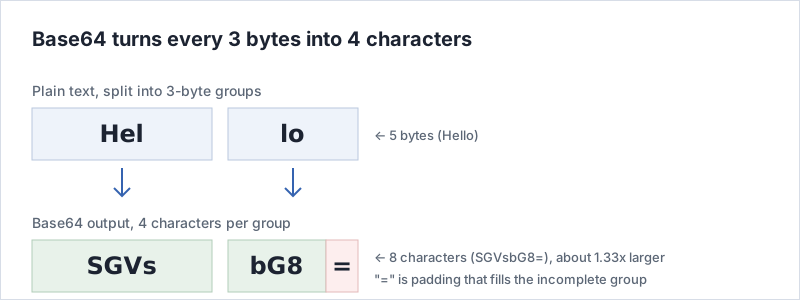
Base64 rewrites binary data using only 64 characters — A–Z, a–z, 0–9,
+ and /. Because 64 is 2 to the power of 6, one character carries
6 bits, so the unit of conversion is the least common multiple of 6 and 8: 24 bits, meaning
3 bytes in and 4 characters out. When the length is not a multiple of 3, the output is padded
with =, which is why a trailing equals sign often appears.
Nothing is discarded, only re-spelled, so the result is about 1.33× longer (33% larger) than the input. The exact output length is 4 × ceil(input bytes ÷ 3).
What this tool does
- One button, both directions. There is nothing to switch. Whichever box you typed into last is the input, and the result is written to the other one.
-
Full Unicode support.
The plain-text side is treated as UTF-8 bytes, so the Japanese
こんにちはconverts to44GT44KT44Gr44Gh44Gv, and emoji work too. - Line breaks are fine. MIME email and PEM files wrap the string at a fixed width; whitespace is stripped before decoding, so you can paste it as it came.
- Everything runs in your browser. No request is made to convert, so once the page has loaded it works offline. Each box holds up to 10,000 characters.
- No sign-up, no install. There is no account, no login and nothing to download.
When you would use it
-
Inspecting a data URI.
Working out what the string after
data:image/png;base64,in some HTML or CSS actually contains. Paste only the part after the comma. -
Reading a Basic auth header.
Decoding the value of
Authorization: Basic ...revealsusername:password— a useful demonstration of why that header needs HTTPS. -
Looking at a JWT payload.
The second dot-separated segment holds the claims. JWTs use URL-safe Base64, so replace
-with+and_with/before pasting. - Fitting a value onto one line. Carrying a certificate, a key or a small image through a config file or an environment variable as plain text.
Things to keep in mind
Base64 is not encryption. There is no key involved and the rules are public, so anyone can reverse it. It may look unreadable, but nothing is actually hidden — it is no use for protecting a secret.
Also, this converter records what you enter (the conversion direction and the plain-text side). Please do not paste passwords, private keys or personal data. The scope is described in the privacy policy, and the policy for the site as a whole is on the about page.
Frequently asked questions
How do I switch between encoding and decoding?
There is nothing to switch. Of the two boxes, Base64 on top and plain text below, whichever you typed into last is used as the input. Type into the plain-text box and convert to encode; paste into the Base64 box and convert to decode.
Does Base64 make a file smaller?
No, it grows by about 33%. Base64 rewrites every 3 bytes as 4 characters and has no mechanism for discarding information, so it is not compression. To reduce size, compress with ZIP or gzip first and encode the result.
Can I use Base64 to hide data?
No. There is no key, so anyone who knows the encoding can reverse it. Use real encryption such as AES for anything that must stay secret.
Is there a limit on how much I can convert?
Each box accepts up to 10,000 characters. Everything is processed inside the browser, so pasting something as large as an image file could leave the tab unresponsive, which is why the limit exists.
Read more
Where Base64 came from, where it turns up and how URL-safe Base64 differs are covered in what is Base64? FAQ and guide. Step-by-step instructions and troubleshooting are on how to use, and the other tools and tables are listed on the tool list.