What is Base64? FAQ and guide
The mechanics, uses, and caveats of Base64.
What Base64 is
An encoding scheme that represents binary data with only 64 characters —
letters, digits, +, / and = for padding.
Data survives text-only channels. It is not encryption.
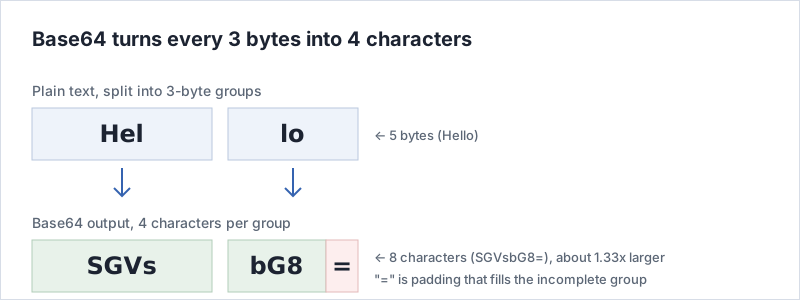
3 bytes become 4 characters. Example: Hello → SGVsbG8=
Uses: email attachments (MIME), data URIs, Basic authentication, JSON / XML, JWTs.
Why Base64 exists
Computer data is a sequence of bytes, and a byte can hold any value from 0 to 255. Older transport mechanisms — early email in particular — were built on the assumption that only values meaningful as text would pass through. Push the raw bytes of an image or an executable through one of those and values get rewritten, or some device along the way reads a byte as a control character and the transfer itself goes wrong.
The response was to rewrite binary using only characters known to survive any route. That is Base64. By restricting itself to 64 characters — uppercase letters, lowercase letters, digits and two symbols — it can carry binary through places that only accept text.
Most transports handle binary fine today, but the situations that call for putting binary into a text-shaped container have not gone away: fitting a key onto one line of a config file, holding a file inside a JSON string, passing a value in a URL. Base64 is still everywhere for that reason.
How the conversion works
The 64 characters are A–Z (26), a–z (26),
0–9 (10), plus + and / (2) —
exactly 64 in total.
Because 64 is 2 to the power of 6, one character carries exactly 6 bits. The input is made of 8-bit bytes, so the unit of conversion is the least common multiple of 6 and 8: 24 bits, which is 3 bytes in and 4 characters out.
- Split the input into 3-byte (24-bit) groups.
- Divide each 24 bits into four 6-bit pieces.
- Map each 6-bit value (0–63) to its character.
When the length is not a multiple of 3, the final group holds 1 or 2 bytes. The missing bits
are filled with zeros to form characters, and the output is padded to four characters with
=: two of them if one byte was left over, one if two bytes were.
Output length is 4 × ceil(input bytes ÷ 3). So 10 bytes give 4 × 4 = 16 characters, and 100 bytes give 4 × 34 = 136 characters.
Where you run into it
- Email attachments (MIME): attachments are Base64-encoded into the message body, conventionally wrapped every 76 characters.
-
Data URIs:
writing
data:image/png;base64,followed by the encoded bytes embeds an image directly in HTML or CSS, which saves a request for small icons. -
Basic authentication:
username:passwordis Base64-encoded into an HTTP header. This is formatting, not secrecy — over a connection without HTTPS, the credentials are readable as they pass. - JWT (JSON Web Token): header, payload and signature are URL-safe Base64 joined with dots. Anyone holding the token can read the payload, so nothing secret belongs in it.
-
PEM certificates and keys:
the body of a file starting with
-----BEGIN CERTIFICATE-----is Base64. - Binary inside JSON or XML: neither format can hold raw bytes, so the bytes travel as a Base64 string.
On it not being encryption
A Base64 string is unreadable at a glance, which makes it feel like a way of hiding something. But Base64 has no concept of a key. The rules are published and anyone can run them backwards, so as a means of keeping information secret it is worth precisely nothing.
Base64 does not make data unreadable; it makes data survivable in transit. To protect a password or personal data, use real encryption such as AES, or — for stored passwords — a password hash such as bcrypt. That Basic auth headers and JWT payloads happen to be Base64 does not make them safe.
Standard vs URL-safe Base64
The + and / used by standard Base64 already mean something inside a
URL: / separates path segments, and + is sometimes read as a space in
a query string. For URLs and filenames, a variant that swaps those two characters is used
instead.
| Item | Standard Base64 | URL-safe Base64 |
|---|---|---|
| Character 62 | + | - |
| Character 63 | / | _ |
| Trailing padding | = present | usually omitted |
| Typical use | Email, data URIs, PEM | JWT, URLs, filenames |
This tool handles standard Base64. A string containing - or _
will not decode as it is.
Frequently asked questions (FAQ)
Encoding vs decoding?
Encoding turns data into a Base64 string; decoding does the reverse. This tool auto-detects from the last field you edited.
Is Base64 encryption?
No. Anyone can reverse it without a key. Use encryption such as AES for sensitive data.
How much does the size increase?
About 1.33x (33% larger).
What is the "=" at the end?
Padding that aligns the output to multiples of 4 characters. Not part of the data.
What about URL-safe Base64?
It replaces + and / with - and _, which are safe in URLs. Used in JWTs.
Why does decoding fail?
The input does not match the Base64 format (4-character groups, allowed characters, padding), or the result is invalid UTF-8.
Is my input sent anywhere?
The conversion happens in your browser. However, input is recorded, so see the privacy policy.
Does Base64 compress data?
No, it does the opposite. Base64 rewrites every 3 bytes as 4 characters and has no mechanism for discarding information. To make something smaller, compress it first with ZIP or gzip and then encode the result.
Are PEM certificates and keys Base64?
Yes. The block between the BEGIN CERTIFICATE and END CERTIFICATE lines is DER binary encoded as Base64 and wrapped every 64 characters. Because it is text, it can be pasted into a config file or an environment variable.
How is Base64 different from Base32 or Base58?
They differ in how many characters the alphabet has. Base32 uses only uppercase letters and digits, which makes it robust when read aloud or transcribed by hand but longer than Base64. Base58 removes easily confused characters such as 0 and O or I and l, and is used for things like cryptocurrency addresses.
Can Base64 with line breaks still be decoded?
Yes. MIME email and PEM files wrap the string at a fixed width, but line breaks and spaces carry no meaning, so this tool strips them before decoding.
Related pages
Step-by-step instructions, including what to check when decoding fails, are on how to use the converter. How this site is built and run is described on the about page, and the other tools are listed on the tool list.